

By Eddy Hood, Founding Partner, Ignite Spot Accounting
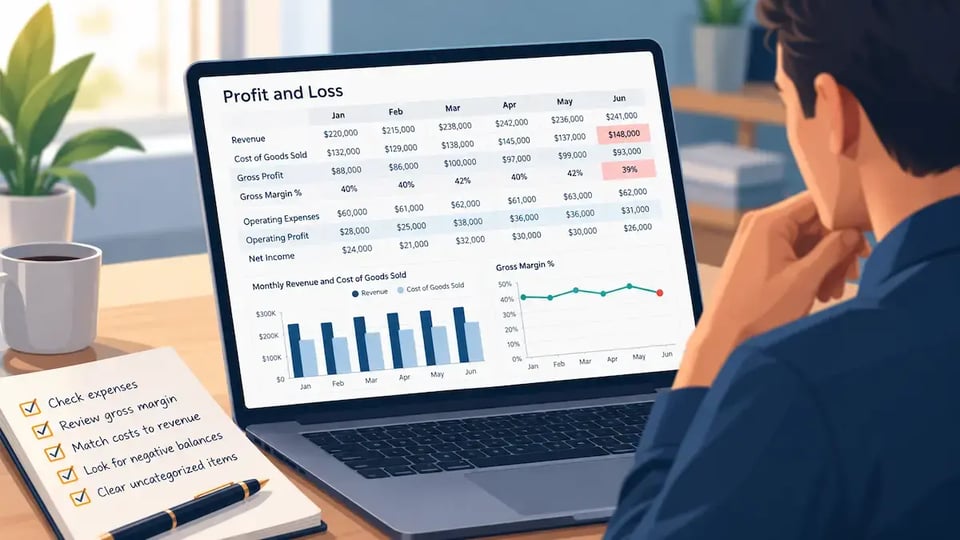
One of the first things I do when opening a new client's QuickBooks file is change how the profit and loss statement is displayed. I want six months of activity, side by side. Why? Because I don't trust a P&L until I've had a chance to see how the numbers behave over time.
Knowing how to read a profit and loss statement starts with following the money down the report. Then I check whether the numbers deserve my confidence.
How to read a profit and loss statement
Start with revenue, your income from sales. Subtract cost of goods sold, the direct costs of delivering those sales, to get gross profit. Next come operating expenses, such as administrative costs and office rent.
Subtract operating expenses to get operating profit. After other income and expenses, including interest and income taxes where applicable, you reach net income. That's the bottom line, but profit and loss statement accuracy depends on the entries behind every section.
I've found that business owners spend a lot of energy trying to reduce overhead. They negotiate rent, cut subscriptions, and look for ways to trim administrative costs. Those things matter, but I believe the bigger opportunity is often hiding in gross profit.
If we can improve gross margin by just one percentage point, that improvement can flow straight to operating profit without selling another dollar of revenue, assuming revenue and other costs remain unchanged.
Before making those decisions, though, I want to know whether the report makes sense. To check a P&L for accuracy, compare monthly expenses, examine gross margin, check revenue and cost timing, and investigate unexplained negatives and uncategorized transactions. These checks identify questions worth asking; they don't prove every entry is correct.
I founded Ignite Spot in 2008 and have helped hundreds of businesses develop reliable accounting systems. Here are the five checks I start with.
1. Look for unusual changes in expenses
Compare at least six completed months side by side so unexpected expense changes stand out. A year-to-date total can hide the month when something went sideways.
Suppose rent has consistently been $2,000 a month, then suddenly increases to $3,200. I want to know why. That's a $1,200 increase, or 60%.
Maybe the lease changed. Maybe an additional charge belongs there. Or perhaps a transaction was recorded twice or assigned to the wrong account. An unexpected amount deserves investigation, not an automatic correction.
Look at both dollar changes and percentage changes. A small percentage increase on a large expense can matter more than a dramatic percentage jump on a tiny one. Comparing expenses as a percentage of revenue adds useful context, too.
Open the transactions behind the unusual amount and check them against invoices or other records. Ask what changed before deciding what to fix.
2. Watch your gross margin percentage
Your gross margin percentage shows how much of each revenue dollar remains after the direct costs of delivering your products or services.
The formulas are straightforward:
Gross profit = Revenue − Cost of goods sold
Gross margin percentage = Gross profit ÷ Revenue × 100
For a service company, cost of goods sold may be called cost of services or cost of revenue. It might include employees or contractors delivering client work, depending on your accounting policies. Keep that classification consistent across months.
What does a change in gross margin mean?
A changing gross margin means revenue and direct costs are moving differently. Suppose a hypothetical agency earns $100,000 and records $60,000 in direct costs. Gross profit is $40,000, and gross margin is 40%.
If next month's revenue stays at $100,000 but direct costs reach $65,000, margin falls to 35%. Revenue alone wouldn't reveal that change.
A drop doesn't automatically mean bookkeeping errors. Service mix, pricing, utilization, and direct labor costs can all affect margins. Compare the percentages, then ask what happened in the business.
For an agency, consultant, or IT firm, I would examine how much client work the delivery team completed relative to its cost. More sales won't necessarily improve business profitability if delivering those sales consumes too much of each dollar.
3. Make sure revenue and direct costs belong together
On an accrual-basis P&L, the direct costs associated with earned revenue should generally appear in the appropriate period alongside that revenue. Otherwise, the gross margin can mislead you.
Consider a hypothetical consulting firm that completes a $20,000 project in June. It earns and records the revenue in June, but the $8,000 contractor cost for that work isn't recorded until July.
Ignoring other activity, June appears to have $20,000 in gross profit from the project instead of $12,000. July carries $8,000 in cost without the corresponding project revenue. June looks too good; July looks too weak.
Ask your accountant to review when the work occurred and whether an accrual or other adjustment is needed. Moving a payment date or invoice date simply to make the margin look better isn't the answer.
Cash-basis reporting follows different timing
Cash-basis reporting generally recognizes income when received and expenses when paid, rather than matching earned revenue and incurred costs the same way as accrual accounting.
That can create legitimate monthly margin swings when customer receipts and contractor payments happen in different months. Intuit explains the distinction in its guide to cash and accrual reporting.
Check the basis of your QuickBooks profit and loss report before interpreting a timing difference as an error. Apply the same principle in Xero.
Also remember that accurate profit doesn't equal available cash. I explain that distinction in profit versus cash flow.
4. Investigate unusual negative balances
Unexpected negative amounts in revenue or expense accounts deserve an explanation, even when they're legitimate.
A vendor refund might create a negative expense. Customer credits can reduce revenue. Reversals and corrections can also produce negative amounts.
What concerns me is an amount nobody can explain. A transaction might belong in another account, or a correction might have been entered incorrectly.
Open the detail, identify the original transaction, and confirm the reason for the credit or reversal. Don't delete an entry simply because its minus sign looks uncomfortable. Understanding it is the goal.
5. Check the “Ask My Accountant” account
A growing “Ask My Accountant” balance can indicate unfinished classification work in QuickBooks. Some users place transactions there temporarily when they don't know where those transactions belong.
The account may not exist or be used in every file. If it is present, review the individual transactions, including offsetting entries that could leave a small net balance while still hiding unresolved items.
Ask your bookkeeper to confirm the appropriate treatment using receipts, invoices, and the purpose of each transaction. Some items may belong in a different expense account; others may belong on the balance sheet.
Resolve those questions before relying on category totals or gross margin. A holding account is a place to ask a question, not a permanent answer.
Why one percentage point of gross margin matters
A one-percentage-point improvement in gross margin can meaningfully increase operating profit when revenue and other costs stay unchanged. That's why I believe direct service-delivery costs often deserve more attention than overhead.
Consider this hypothetical annual example:
| Metric | Before | After |
|---|---|---|
| Annual revenue | $2,000,000 | $2,000,000 |
| Gross margin | 40% | 41% |
| Gross profit | $800,000 | $820,000 |
| Operating expenses | $600,000 | $600,000 |
| Operating profit | $200,000 | $220,000 |
The additional gross profit flows through to operating profit: $20,000 more, with no additional revenue. Your dollar result depends on your revenue. Net income may differ after interest, taxes, and other nonoperating items.
Overhead still matters. But before trimming office expenses again, examine project pricing, staffing utilization, rework, and contractor costs. Look for ways to deliver work efficiently while protecting quality.
Try this with your own P&L
Use your own report to turn these checks into a short list of questions and decisions:
- Open your Profit and Loss report in QuickBooks Online. Set the report dates to cover the last six completed months, then choose Months in Display columns by to see each month separately. Confirm the accounting basis.
- Identify three expenses that changed unexpectedly. Compare dollar amounts and percentages.
- Calculate or display gross margin percentages for each month using consistently classified direct costs.
- Investigate the largest gross margin change. Check business activity, transaction details, and revenue-and-cost timing.
- Review unusual negative amounts and “Ask My Accountant” transactions. Resolve unexplained items with your bookkeeper.
These checks don't replace reconciliations or a complete month-end review. Give each unresolved question an owner and a follow-up date.
Use your P&L to decide what to improve
I believe a P&L is one of the best cost-control tools available to a business owner. Its value comes from understanding why the business performed as it did and deciding what to improve next.
Your P&L shouldn't be a report you glance at once a month and file away. It should help you understand where you're making money, where you're losing it, and what needs your attention. That's when accounting becomes a tool for running a better business.
If you'd like help building that foundation, we help business owners maintain accurate financial records and understand their numbers. Our outsourced bookkeeping services give you a dedicated, U.S.-based bookkeeper who is a W-2 employee of Ignite Spot. You're welcome to explore how we work whenever you're ready.







.webp?width=300&height=67&name=image%20(4).webp)





.webp?width=160&height=160&name=Gold%20(1).webp)